








Skip to content
delta
v0.4.2ReleasedTheme Different

The agent-first WordPress theme with built-in MCP

Build and maintain WordPress sites through the agent you already use. One abilities surface for HTML, CSS and JS, templates and your design system.

WordPressClaudeChatGPTCursor
Hello, Delta

A lightweight and scalable theme canvas your agents can actually operate

Delta gives your agent one shared way to work with page code, templates and styles. It replaces your current theme, so evaluate it as the base for a new site or a planned rebuild.

Standard syntax
Agents write standard HTML, CSS and JavaScript. There are no builder conventions to learn.
Tokens by design
Start from Delta’s seed design system, bring your own framework, or build one from scratch.
Context-aware by design
Rules, skills and memory grow as you work, so each session starts where the last one stopped.
Templates for every part
A complete template engine for every part of your WordPress site.
Block editor for posts
Keep writing posts and content in the block editor. Everything else is HTML, CSS and JavaScript.
Neutral style, strict rules
Delta brings no design taste of its own. Your agent sets the style; Delta keeps the mechanics strict.
Web-native composition

Write in HTML, CSS and JS

The agent writes the page markup directly. It does not select from a widget catalog. What it writes is plain HTML, CSS and JavaScript: no wrapper markup, no builder stylesheet. Works with any MCP client, including Claude, Codex, ChatGPT and Cursor.

SYNTAXStandard syntaxAgents write HTML, CSS and JavaScript, not builder conventions.
OUTPUTMinimal outputPages contain only the markup and CSS the agent wrote.
STYLESScoped stylesEach page carries its own CSS and JS, stored next to its markup.
Proposal 014 · home.html+8
01<header class="site-header">
02 <a class="logo" href="/">Studio Nord</a>
03 <nav>…</nav>
04</header>
05<main>
06 <section class="hero">
07 <h1>Places, built slowly</h1>
08 <a class="btn" href="#work">See the work</a>
09 </section>
10+ <section class="team">
11+ <h2>The studio</h2>
12+ <div class="grid">
13+ <article class="card">…</article>
14+ <article class="card">…</article>
15+ <article class="card">…</article>
16+ </div>
17+ </section>
18</main>
19<footer class="site-footer">…</footer>
Mockup · for illustration only
Front panel

Front panel: Hands-on control when you need it

Press ⌘⇧E on any page of your live site. Edit text in place, see how your pages connect, and explore ideas with your agent on a draft sketchbook.

Change text on the fly, without involving your agent

Click a heading, a label or a paragraph and type. Delta saves only the characters you changed, and tells you when the text sits in a template that other pages share.

  • Click and edit any text element
  • See its related HTML and CSS
  • Save changes in bulk
Template engine

Templates for every part of the site

By default, Delta theme ships without templates. Agents build any template your site needs, on the fly.

Single
Archive
Loop item
404
01Regulara page
02Archivepost lists
03Singleone entry
04Search Resultsresults
05404missing pages
06Loop itemone card
07Headersite chrome
08Footersite chrome
Icon sets

Built-in icon manager. Import sets or upload your own.

Install an open-source icon set, whole or only the icons you need, or create a pack from your own SVG files or a zip. Files are sanitized on save. The agent places installed icons by name, inline and without external requests, and only the icons a page uses are sent to the visitor.

Why there is no builder

The agent is the interface.

Until now, building a WordPress site meant learning a tool first: a theme’s options, a builder’s panels, a widget catalog. The tool stood between you and the page.

Delta removes the tool. You describe the page, the agent writes the HTML, CSS and JS, and you review the diff before it ships. There is no proprietary markup to learn, no wrapper divs, no builder stylesheet. What you asked for is what the visitor gets.

Build a landing page with a new hero, three pricing plans and an FAQ.

Delta ships a compact design system of tokens and styles, that you can extend and customize. And apart from a a few basic layout skills, Delta's taste does not interfere with your agent. You shape your design system as you go.

Neutral on style, strict on mechanics.

Create a new semantic token for the gap between card elements.
Used Delta: Update tokens
No page builder

No builder UI. Your agent does the building.

Delta has no drag-and-drop editor, no widget panels and no style controls to click through. You tell your agent what you need, and it builds through Delta’s abilities. You choose which abilities it can use, and you review what it makes.

DESCRIBEPrompt your intention to the agent
BUILDThe agent executes through Delta’s abilities
REVIEWReview, approve and take snapshots before major changes
The design system

Scalable by design

Delta ships a base set of primitive and semantic tokens for color, type, space and more. Extend them, bring your own framework such as ACSS, Core Framework or Tailwind, or start from scratch.

TOKENS
Design tokensColor, type, space, radius and more. A basic token setup that agents can understand.
SYSTEMS
Any design systemUse Delta’s seed design system, bring your own, or use a framework like ACSS or Core Framework.
SOURCES
Design sourcesToken values can be imported from a design file, a stylesheet, or a written description.
NOTES
Design notesShort notes on design decisions, kept with the design system.
FONTS
Built-in font managerInstall Google Fonts or upload your own, served from your site.
SKETCHBOOK
SketchbookDraft ideas with your agent on boards, over your live site.
design-system / tokens.json8 tokens
Aa--font-title · Funnel Sans 500
--color-surface-body#E4DED1
--color-ink#26292A
--color-action#2242C7
--color-surface-contrast#15171B
--font-titleFunnel Sans
--font-textFunnel Sans
--space-xl48px
--radius-md6px
Mockup · for illustration onlyRead the docs →
Sketchbook

Draft ideas with your agent, on your live site

Collaborate with your agent on a sketchbook canvas, without affecting your live page. Create variations, a component library or a style guide, in a safe and scalable design sandbox.

Abilities

An ability for each job

Create a page, apply a template, upload media, update tokens. Each action is a named ability.

Abilities for the whole site

Pages, templates, design tokens, media, menus and memory, each with its own abilities.

Enable or disable abilities

Switch off any ability you do not want the agent to use.

Mockup · agent@studio-nord ·
Create page01
List templates02
Apply template03
Patch page content04
Preview page05
Get entry06
Create template07
Update page08
Set condition09
List conditions10
Upload media11
List media12
Set feature enabled13
List features14
Get media15
Preview condition16
List skills17
Append memory18
Upsert rule19
List menus20
Create content type21
Sync field maps22
Set site identity23
List field maps24
List components25
List icon packs26
List fonts27
Install icon pack28
Rebuild component index29
Restore design snapshot30
Scaffold component31
List snapshots32
Create user33
List plugins34
Create term35
List taxonomies36
Update option37
List comments38
Get user39
Update term40
Demos

Built by Delta

Watch the build
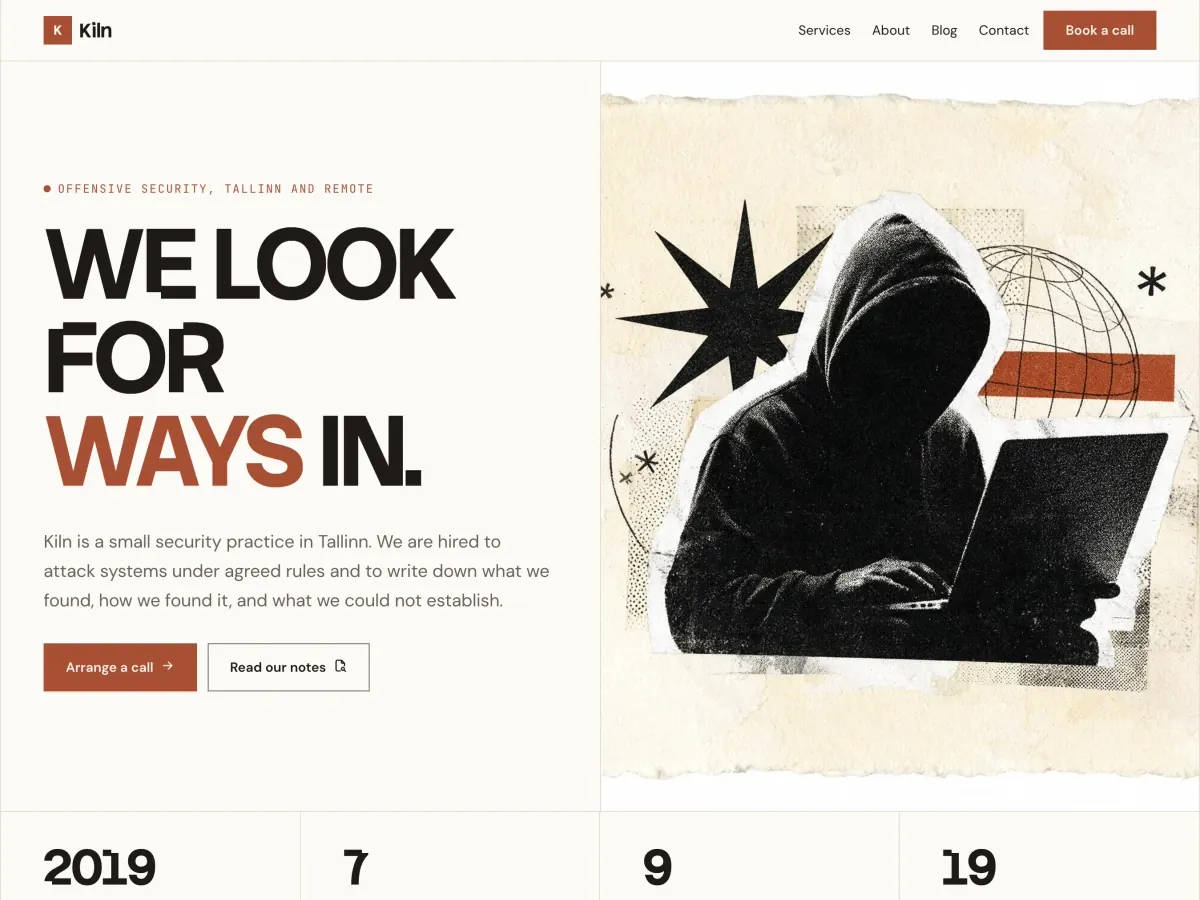
The Kiln demo: an offensive security site with a heavy condensed headline beside a print-collage image
KilnCyber Security Team
The Nordra demo: an expedition site with a condensed headline over a fjord in cloud
NordraAdventure Blog
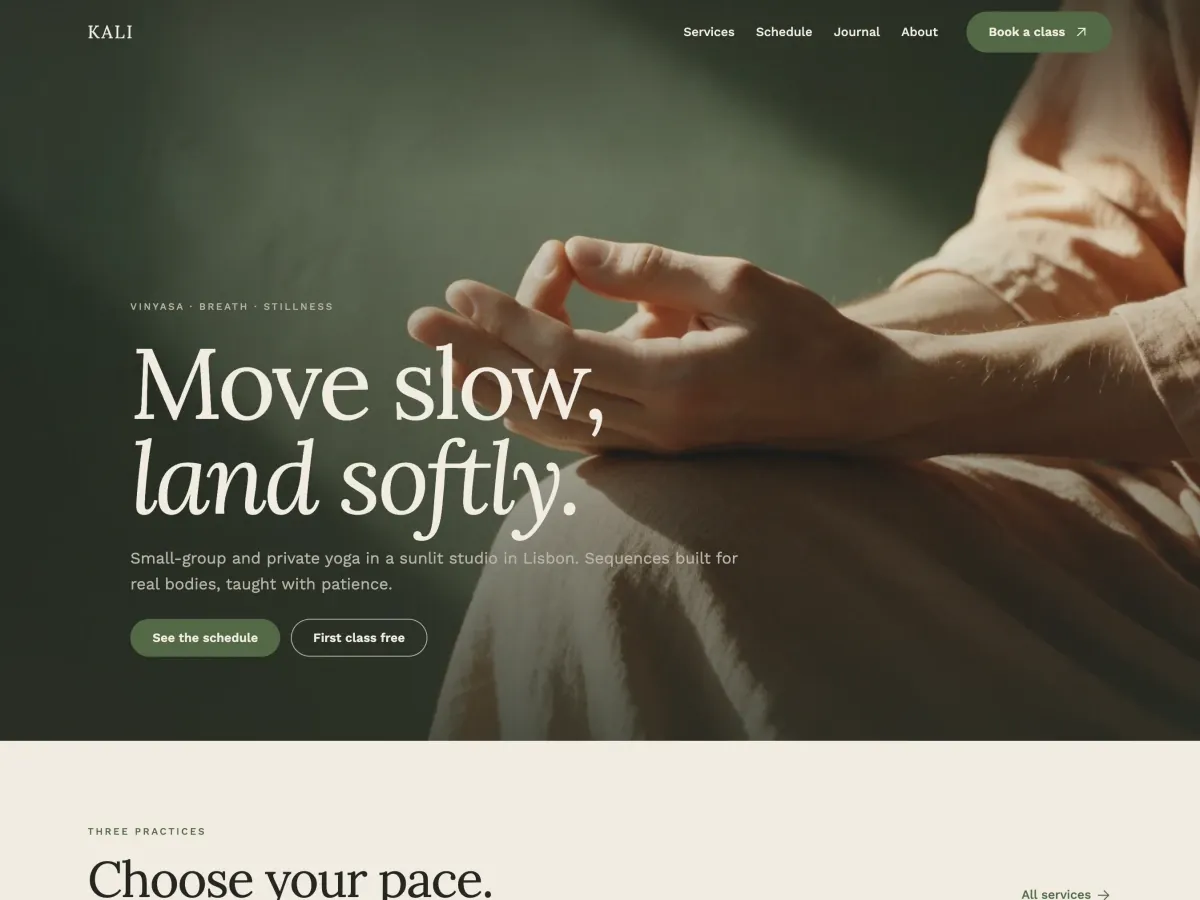
The Kali demo: a yoga studio site with a serif headline over a photograph of hands at rest
KaliYoga Studio
Skills in action

Skills, Rules and Memory for continuity across sessions.

Ask for a site and the onboarding skill takes over. It asks what you need, collects content and branding, and lets you keep the seed design system or bring your own. Each step is written to memory, so the next session picks up where this one stopped.

~/sites/nordra — delta agent
✓Connected to nordra.local · context loaded · 6 rules · 18 skills · 0 memory entries
›Set up the site. It’s for Nordra, a small expedition company.
●load-skill (onboarding)
⎿No site templates yet · seed design system active · site-context empty
●I’ll go step by step, one question at a time. First: who visits the site, and what should they do there?
›People planning a trip. They read our expedition reports and book a call.
●patch-rule (site-context › About this site)
⎿Saved: Nordra, expedition company · visitors read reports and book a call
●Site basics. The name is Nordra. What is the tagline, and do you have a logo?
›“Expeditions, documented.” The logo is in the media library: nordra-mark.svg.
●set-site-identity (name, tagline, logo)
⎿Set: Nordra · Expeditions, documented. · nordra-mark.svg
●Content. Which pages do you need, and do you have the text? 1. I’ll paste it 2. Draft it from the brief, I’ll edit
›2. Pages: Home, Expeditions, Reports, About, Contact.
●Design. The seed design system is active. 1. Keep the seed and adjust the branding 2. Bring your own: a CSS file, a design.md, a token list or a Figma link
›1. Brand colour #0F4C5C, type Inter.
●load-skill (design)
●update-tokens (color-action, font-text)
⎿2 tokens changed · snapshot taken
●append-memory (open)
⎿Onboarding. Scope: full setup. Done: site context, identity, design. Next: pages, menus, templates.
●Next I create the five pages, the menu and the templates, and show you a preview before anything is published.
›
⏎ send · esc to interruptMockup · for illustration only
Nordra
Make a skill for writing expedition reports, in our voice.
Used Delta: Create new skill
Integrations

Works with the tools you already use

Integrations add plugin-specific abilities to the same agent workflow, so the agent creates a product, a form or a field group the same way it creates a page.

View integrations
Admin interface

WordPress admin pages for when you need them

The agent works through MCP. The Delta dashboard in WordPress is for you: check the design system, templates, abilities, fonts and icons, in light or dark.

Content graph

Your site as a graph

Pages, posts, templates and the links between them, drawn as nodes you can move. See how your content connects at a glance.

MapAgentFind…
+−Fit
Entry×
Agent-first themes
Type
Post
Status
Published
Modified
1 Oct 2026
Delta
Custom HTML
EditView on site ↗
Belongs to · 1Posts
Links to · 1Pricing
PublishedDraftScheduledPrivate
+−Fit
Coming soon

Upcoming features

We are shipping weekly. What is in progress and planned can change in order and timing. See what has shipped in the changelog.

Connector permissions

Share AI connectors with your clients, with scoped ability permissions. Let them make content changes without being able to build.

PHP abilities

Create custom abilities in PHP that agents can discover and call for server-side WordPress work.

Site library

Curated starter sites to import and adapt, each with its own design system.

Extended integration coverage

More plugins exposed as abilities in each update we ship.

The framework you need to programmatically generate sites at scale

Set up a framework once, with your own skills, rules, tokens and templates, and reuse it on every client site. Delta keeps the context with the site, so the whole team works from the same ground. Come back after months and the memory shows the last session and the open items.

Your own skills and rules, reused per client.
Notes and memory stay with the site, shared by the team.
Return after months and see what is open.
Who builds Delta

Humans in the loop

We are John and Krishna, and we have been building WordPress products together for almost a decade.

Read our story

John Fraskos

Designer

Fifteen years in WordPress. The last ten on design systems, design operations and keeping sites from drifting as they grow.

Krishna Kant Chourasiya

Developer

Engineer first. A decade of WordPress themes and plugins, now fully in AI-driven workflows.

Pricing

Early development. Get the Founder’s Lifetime License.

Pay once, and get updates and support for life. Upgrade from single site to unlimited at any time.

Single site$49Regular price $99
Unlimited sites$99Regular price $199
See pricingFounder’s License · one payment · 30-day refund

Questions

Asked before buying

Do I need my own AI subscription?

Yes. Delta connects to the agent you already use: Claude, ChatGPT, Codex, Claude Code, Cursor, Windsurf, or any other MCP client, so the work runs on your existing subscription and its limits.

Can I still write posts in the block editor?

Yes. Delta is a hybrid theme: the block editor stays available for posts and pages, and you can also write plain HTML. There is no Site Editor. Templates, headers, footers and the design system are the agent’s work, through the template engine. Delta locks the editor only on entries it manages itself as HTML.

Can I use Delta with a page builder?

Not really. Delta replaces a page builder and cannot run on top of existing builder layouts. Install and activate Delta, then ask your agent to make the changes you want.

Does Delta work with other plugins? What are plugin integrations?

Yes. Delta works with most other plugins, not only the ones that have an integration. An integration makes Delta and a plugin work together more closely, and in many cases adds extra abilities for your agent. If you want a plugin from your stack integrated with Delta, send us a message.

Can I import existing HTML, CSS and JavaScript pages?

Yes. Give the agent the markup, or the URL of the page, and ask it to bring the page in. It places the result as a page or template and, if you ask, moves the values onto your design tokens so the page matches the rest of the site.

Is there an admin area?

Yes. Delta adds a menu to wp-admin with screens for connections, abilities, context, design and more, plus a code editor for HTML, CSS and JavaScript. There is no visual builder, and everything the screens show can also be configured by the agent.

Does the unlimited license cover client sites?

Yes. The Unlimited Sites license covers every site you run, your own and your clients’. With the Founder’s License it is $99, paid once (regular price $199). The single-site license is $49, paid once (regular price $99), and you can upgrade to unlimited at any time.

Does Delta work on WordPress multisite?

Yes. Delta runs on every site in a multisite network. The license counts each site in the network as one site, so a network with two or more Delta sites needs the Unlimited Sites license. Read Multisite networks for the setup.

Can I get a refund?

Yes. Every purchase has a 30-day refund window, including during early development. We refund your payment, minus a small processing fee.

Can someone break the site through the chat panel?

Every change is a proposal with a diff. Nothing writes until you approve it, guardrails gate destructive actions, and design-system writes are snapshotted so they can be restored. Scoped access for clients, where their agent can touch content but not structure, is on the roadmap and does not ship yet.

Which WordPress setups are supported?

Delta is a standard WordPress theme. It needs WordPress 6.9 or later and PHP 8.2 or later, and it coexists with your existing plugins. Delta is in early development and is released to gather input from people building real client sites.

Unlock your agent’s workflow

Delta is in early development. Get the Founder’s License now: one payment, lifetime updates and support.

30-day refund window.